Log it from your wrist.
When you're holding a baby, a bottle and the last of your patience, your phone is always in the other room. Your watch isn't. Tap to log, start a timer, and see how long it's been since the last feed.
Three steps. About a minute.
- 1📲
Get Poopyfeed on your iPhone
The watch app comes with the iPhone app. Sign in and add your kid on the phone first.
- 2⌚
Install it on your watch
In Poopyfeed, tap your account button (top right) → Apple Watch → Set up Apple Watch. That opens Apple's Watch app: scroll to Available Apps and tap Install next to Poopyfeed.
- 3✨
Put it on your watch face
Touch and hold your watch face → Edit → swipe to the complications and pick Poopyfeed: Last feed for a corner or circle, or Feed, diaper, sleep for the big rectangle.
Needs Apple Watch with watchOS 26 or later, paired with an iPhone running Poopyfeed.
The stuff you need at 3am. Nothing else.
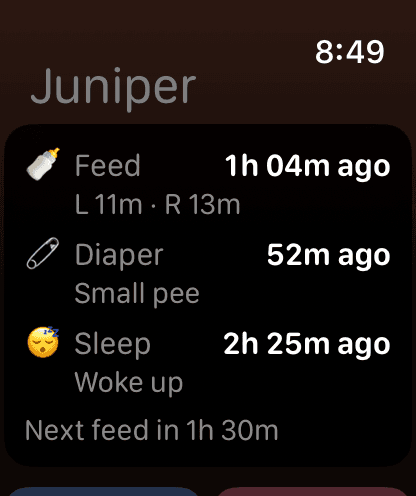
Everything since the last feed
Last feed, diaper and sleep with what they were, plus a countdown to the next feed.
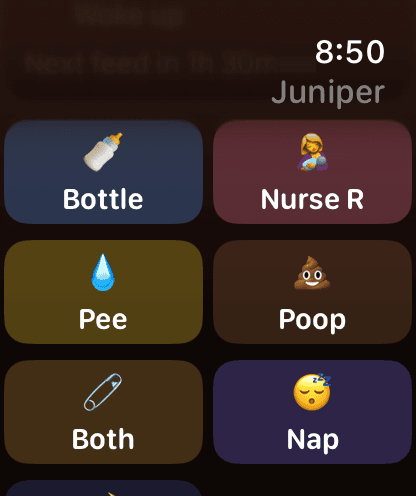
One-tap logging
Pee, poop, both, nap, asleep or awake: one tap, using the choices you made last time on your phone.
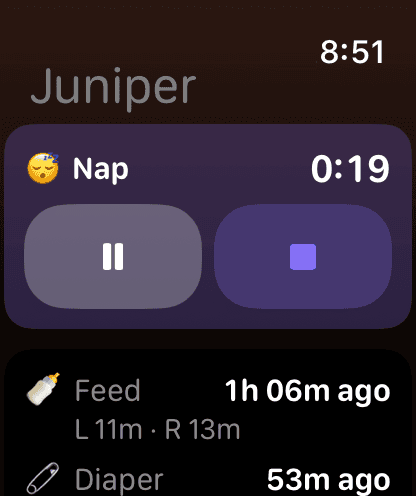
Nursing & nap timers
Start, pause, switch sides, stop and save. The same timer runs on your phone and your partner's.
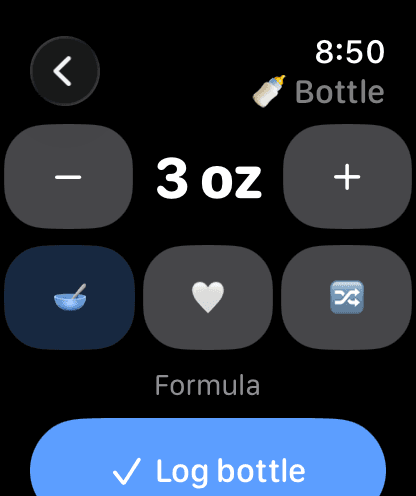
Bottles on the Crown
Twist the Digital Crown to the amount, pick formula, breast milk or mixed, and log.
Raise your wrist. That's the whole check.
Put Poopyfeed on any watch face. The circle and corner show time since the last feed; the rectangle shows feed, diaper and sleep together. When a nursing or nap timer is running, it shows the live clock instead.
Questions
Does my iPhone need to be nearby?+
Your watch talks to Poopyfeed on your iPhone, and the iPhone syncs everything to iCloud. If your phone is out of range, taps are saved on the watch and sent the moment it's back, with the time you tapped.
Will my partner see what I log on the watch?+
Yes. Watch logs go through your iPhone exactly like logs made on it, so they reach everyone you share the kid with through Family Sharing.
I have more than one kid.+
Tap the avatar at the top left of the watch app to switch kids. The watch starts on whichever kid is open on your phone.
It says “Open Poopyfeed on your iPhone to get started.”+
Open Poopyfeed on your iPhone once with your watch nearby. The watch fills in a few seconds later.
Is the watch app extra?+
No. It's free, like logging, timers and stats. Only Family Sharing is a subscription.
Still stuck? Visit support or email poopyfeed@proton.me.